
Certification Test: Why Your Network Cable Failed
Most “bad connection” calls we get start the same way: the internet worked yesterday, it doesn’t today, and nobody touched anything. Half the time, the real problem isn’t the router, the switch, or the ISP — it’s a network cable that looks perfectly fine but has failed internally. So we ran a real certification test on camera, on purpose, so you can see exactly what a passing cable looks like next to a failing one.
The tool: a real certifier, not a cheap continuity tester
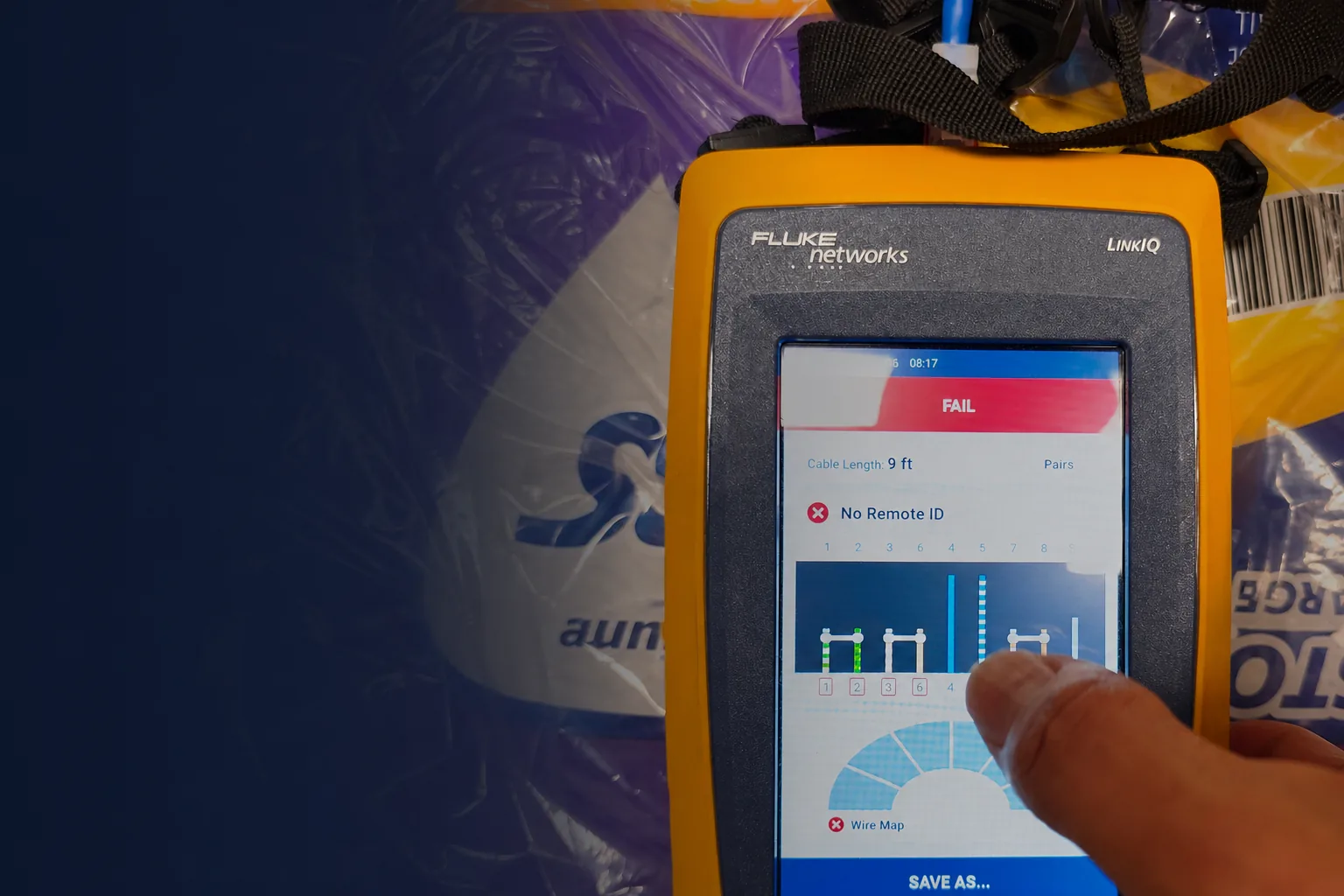
The device in these photos is a Fluke Networks LinkIQ, the same class of tool licensed structured cabling technicians use to certify commercial installations. It doesn’t just tell you a cable is “connected” — it measures every one of the eight individual wires inside, checks the cable’s length, verifies which switch and port it’s plugged into, and can even blink a port’s light so you can physically locate it in a rack.
That distinction matters. A cheap continuity tester or a phone app can tell you a cable carries a signal. It can’t tell you whether that signal will hold up under real network load, or which specific pair inside the cable is degrading.
What we did: broke a cable on purpose
To show what a real failure looks like, we took a working Cat6 cable, plugged it in to confirm it read a clean 9 feet with no faults, then deliberately nicked two of the eight internal wires with a small tool — not a clean cut, just enough damage to simulate the kind of wear a cable takes over years of being stepped on, bent around a corner, or crushed under furniture.
Then we plugged the same cable back in and ran the test again.
The result: FAIL, with the exact cause
This is the part most people never see. The certifier didn’t just say “fail” — it showed exactly which pairs were compromised, flagged “No Remote ID” (meaning the far end of the cable couldn’t be detected at all), and displayed a wire map showing that only one pair, the blue pair, was still passing signal cleanly.
What “No Remote ID” actually means
Modern network cables use multiple twisted pairs together to negotiate a connection between two devices. When enough of those pairs are damaged, the two ends of the cable can no longer identify each other at all — that’s “No Remote ID.” In a real-world office, this is the difference between “the connection is slow” and “the port doesn’t work at all,” and it’s exactly the kind of fault that a visual inspection will never catch, because the cable jacket looks completely intact from the outside.
Why this matters for your business
Every structured cabling job we complete gets certified with this same class of tool before we call it finished — not just plugged in and eyeballed. That’s the difference between a cable that passes a “does the light turn on” check and one that’s actually rated to carry a full gigabit (or better) connection reliably for years. If your office has ever had an intermittent drop on one specific desk or port that nobody could explain, this is very often the cause.
If you want to know whether your building’s cabling would pass a real certification test, that’s exactly what we do. Request a consultation and we’ll come take a look, or call us directly.
Frequently asked questions
Can a network cable fail even if the internet still works?
Yes. A cable with one or two damaged pairs can sometimes still pass basic traffic at reduced speed or with intermittent drops, which is often more frustrating to diagnose than a total failure because it looks like a software or Wi-Fi problem instead.
How often should commercial network cabling be tested?
New installations should always be certified at the time of install. For existing cabling, testing is worth doing any time you’re troubleshooting an unexplained connectivity issue, or before signing off on a space during a move-in.
Call (615) 246-6616 or request a free consultation to get your network cabling professionally tested.